
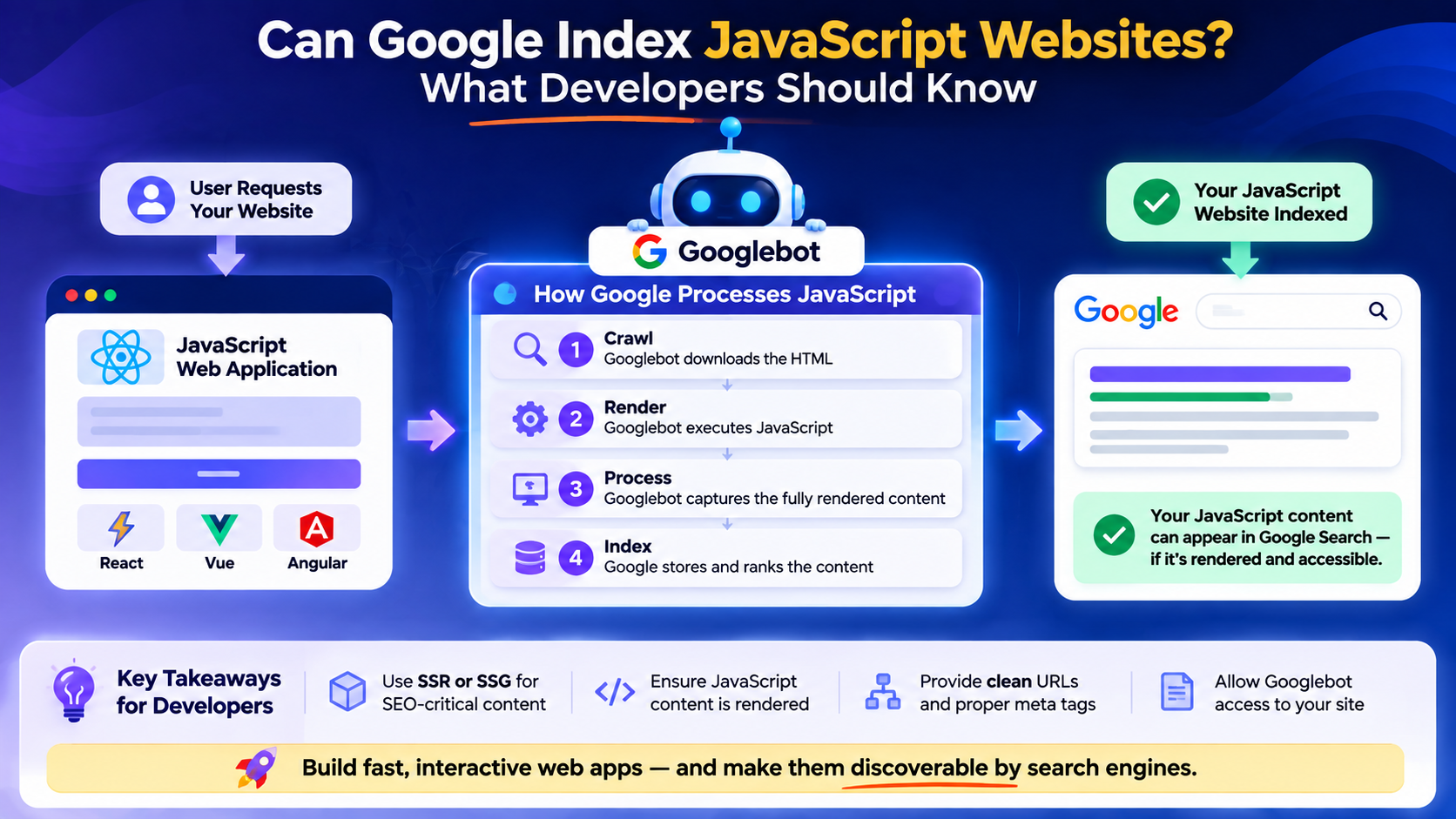
The short answer is yes. Google can process JavaScript and index content generated by modern JavaScript applications. However, that does not mean every JavaScript-powered website will automatically be crawled, rendered, understood, and indexed correctly.
This distinction is important. A website can work perfectly in a browser and still have technical issues that make it difficult for search engines to discover or understand its content. A user may open a page, see the interface load, navigate through the application, and interact with everything without noticing any problem. From the developer’s perspective, the application works.
Search engines have a different experience. They need to discover the URL, access the necessary resources, process the JavaScript, render the page, understand the resulting content, and determine whether that page should be included in the search index.
This is why JavaScript SEO is not simply about whether a framework such as React, Vue, Angular, or Next.js is being used. It is about how the application is engineered and how accessible its content is to search engines.
As a full-stack software developer, I have found that some of the most important SEO questions are actually engineering questions. The rendering strategy, routing architecture, metadata, server responses, performance, and content delivery can all influence how a JavaScript website performs in search.
Can Google Index JavaScript?
Yes, Google can index JavaScript-generated content. Modern search engines have become much better at processing JavaScript than they were in the early days of client-side applications. This means developers do not automatically have to abandon JavaScript or Single Page Applications simply because search visibility matters.
The important issue is whether Google can successfully process what your application delivers. A traditional website may return an HTML document containing the actual page content. A JavaScript application may initially return an HTML shell and then rely on JavaScript to generate the visible interface. For example, the initial response might contain something as simple as:
<div id="root"></div>
The browser then downloads JavaScript, executes the application, retrieves additional data where necessary, and creates the final interface. For a human visitor, this can happen quickly enough that the difference is barely noticeable. For search engines, however, there are additional processing steps. Google needs to discover the URL, crawl the page, render the JavaScript, access the resulting content, and then determine what should be indexed.
Therefore, the better question is not simply:
“Does Google index JavaScript?”
It is:
“Can Google successfully access, render, understand, and index the important content generated by my JavaScript application?”
That is where JavaScript SEO becomes important.
How Google Processes a JavaScript Website
Understanding the basic process makes JavaScript indexing much easier to troubleshoot. There are three important stages to think about:
Crawling → Rendering → Indexing
These stages are connected, but they are not the same thing.
Crawling
Crawling is how search engines discover URLs and request resources from websites. Google may discover a URL through links, sitemaps, or other references to the page. This is why having a technically functional application is not enough. Important pages need to be discoverable. For example, imagine a SaaS platform with public pages for:
//features/pricing/integrations/solutions
If those pages are properly linked and included in the site’s structure, search engines have clear paths through which they can discover them. A page that exists only because a JavaScript event creates it after a user clicks a button may be much harder to discover. This is one reason search-friendly navigation and clean URL structures matter. A URL such as:
example.com/features
communicates much more clearly than an application that relies heavily on routes that are difficult for crawlers to discover or interpret.
Rendering
After discovering a page, Google needs to process its content. This is particularly important for JavaScript-powered websites because the initial HTML may not contain everything a visitor eventually sees. For example, the initial response could contain:
<div id="root"></div>
while the rendered page eventually becomes:
<h1>Business Workflow Automation Software</h1>
<p>Automate repetitive processes and manage business operations from one platform.</p>
The content exists, but it becomes available through JavaScript execution. This is where rendering becomes important. If the JavaScript application depends on resources that cannot be accessed, fails during execution, or requires complicated client-side processes before important content appears, search engines may have difficulty processing the page correctly. This does not mean JavaScript is inherently bad for SEO. It means developers need to make sure that important content is accessible and renderable.
Indexing
After crawling and rendering, Google evaluates the content and determines whether it should be included in its index. Being crawled does not automatically mean that a page will appear in search results. A search engine needs to understand what the page is about and whether it is useful, accessible, and appropriate for its index.
This is where technical SEO and content quality meet. A page can be technically accessible but still fail to perform because its content is thin, duplicated, unclear, or not competitive for the search queries it targets. In other words, getting JavaScript indexed is only part of the SEO process. The content still needs to deserve visibility.
Why Some JavaScript Websites Have Indexing Problems
When developers discover that a JavaScript website is not appearing in Google, it is tempting to immediately blame the framework.
- React gets blamed.
- Angular gets blamed.
- The SPA architecture gets blamed.
- JavaScript gets blamed.
In reality, the problem can come from several different areas.
Important Content Is Not Available
One of the most common issues occurs when important content depends entirely on JavaScript execution and something prevents that content from being properly rendered. For a public page, important information should not be unnecessarily difficult for search engines to access.
This includes:
- headings
- descriptive text
- navigation
- product information
- links
- metadata
- structured information where appropriate
The goal is not to remove JavaScript. It is to make sure the content that matters is accessible.
Search Engines Cannot Discover the URLs
A JavaScript application can have hundreds of screens while exposing very few meaningful URLs. This can create an SEO problem. For example, a user may navigate through an application by clicking interface elements that dynamically change the content without creating properly discoverable routes.
From the user’s perspective, this may feel smooth. From an SEO perspective, it can make the application’s content difficult to discover. Public-facing pages should have meaningful, stable URLs.
Incorrect Robots Directives
Sometimes the application is perfectly capable of rendering content, but technical directives prevent search engines from accessing or indexing it. Robots.txt rules, noindex directives, and other technical configurations can affect how search engines interact with a website. This is why checking the actual indexing configuration is important before concluding that JavaScript itself is the problem.
Incorrect Canonical URLs
JavaScript applications can also create problems around canonical URLs. If multiple routes represent similar or identical content but canonical signals are missing or incorrect, search engines may have difficulty determining which URL should be treated as the primary version. For applications with many dynamically generated routes, canonical URL management should be part of the SEO architecture rather than an afterthought.
Broken JavaScript or API Requests
A page may look perfectly normal when tested manually while still failing under different conditions. For example, a component may depend on an API request that fails intermittently, requires authentication, or returns data only under certain conditions. If important page content depends on that request, the resulting page may not contain the information expected by search engines.
This is why debugging JavaScript SEO problems sometimes requires looking beyond the frontend interface. The API, server configuration, routing, HTTP responses, and resource loading can all be part of the problem.
Does Google Index React, Vue, Angular, and Next.js?
Yes. Using a particular JavaScript framework does not automatically prevent a website from being indexed. React, Vue, Angular, and Next.js can all be used to build search-friendly applications. The important factor is how the application is structured.
A React application using client-side rendering may require more careful SEO implementation than a server-rendered React application. Similarly, Vue can be used with different rendering approaches, while frameworks such as Nuxt provide additional options for server rendering and static generation.
Angular applications can also be optimized for search visibility through appropriate rendering strategies. Next.js provides several rendering options that can make SEO-focused development easier, including server-side and static approaches. The framework is therefore only part of the conversation.
Two developers can use the same framework and produce completely different SEO outcomes because their routing, rendering, metadata, performance, and content architectures are different.
The lesson is simple: JavaScript itself is not the SEO strategy. Architecture is.
How to Check Whether Google Can See Your JavaScript Content
If you suspect that your JavaScript website is not being indexed correctly, do not rely only on what you see in your browser. Your browser is showing you the application after everything has loaded and executed. You need to investigate how search engines experience the page as well.
Start With Google Search Console
Google Search Console is one of the most useful tools for investigating indexing problems. The URL Inspection tool can help you understand how Google views a specific URL and whether the page has been indexed. Instead of checking only your homepage, inspect important pages individually.
For example:
- homepage
- product pages
- feature pages
- service pages
- blog articles
- landing pages
If one page is indexed while another is not, the difference can provide valuable clues.
Inspect Your URLs
Check whether the URLs you expect Google to index actually exist as independent, accessible pages.
Ask:
- Does the URL return a successful response?
- Is the page linked internally?
- Is the page included in the sitemap where appropriate?
- Does it have a unique title?
- Does it have meaningful content?
- Is it accidentally marked
noindex? - Does it have the correct canonical URL?
These questions often reveal problems that have nothing to do with the JavaScript framework itself.
Look Beyond the Browser
Developers naturally test applications by opening them in Chrome, clicking through the interface, and confirming that everything works. That is necessary, but it is not enough for SEO.
Also inspect the application’s HTML, network requests, server responses, routing behavior, metadata, and rendering process. A page that looks perfect visually can still have a weak technical foundation for search.
How Developers Can Build JavaScript Websites That Search Engines Understand
JavaScript SEO should ideally be considered during architecture planning. It is much easier to make the right decisions before an application has hundreds of routes and components than to retrofit SEO after development.
Give Important Pages Meaningful URLs
Public pages should have stable, descriptive URLs.
Use:
example.com/services/saas-development
rather than creating routes that are difficult to understand or discover. Clean URLs benefit both users and search engines.
Use Unique Metadata
Every important public page should communicate its purpose through appropriate metadata. Titles and descriptions should reflect the actual content of the page. A pricing page should not have the same title as the homepage. A blog article should not use generic application metadata. Metadata management should therefore be part of the frontend architecture.
Choose the Right Rendering Strategy
Not every page needs the same rendering approach.
- An authenticated dashboard may work perfectly with Client-Side Rendering because its content is private and does not need to rank.
- A public marketing page may benefit from Server-Side Rendering or Static Site Generation.
- A blog may work particularly well with static generation.
- A modern SaaS product can combine these approaches.
The question is not:
“Which rendering strategy is best?”
The better question is:
“Which rendering strategy makes sense for this particular part of the product?”
Make Navigation Crawlable
Important public pages should be connected through meaningful links. Do not assume that because a user can reach a page through a JavaScript interaction, Google will automatically discover it. Think about how a crawler would move through your application without relying on the assumptions a human visitor naturally makes.
Keep JavaScript Performance in Check
Large JavaScript bundles, unnecessary dependencies, excessive third-party scripts, and inefficient rendering can all affect the experience of using an application. Performance is therefore another area where frontend engineering and SEO intersect. Code splitting, lazy loading, efficient data fetching, and sensible dependency management can help create applications that are easier to use and more efficient to process.
What About Single Page Applications?
Single Page Applications deserve particular attention because they often rely heavily on client-side rendering and dynamic routing. That does not mean a SPA cannot rank. It means developers need to be intentional about how public content is rendered and discovered. A SaaS product, for example, might have a highly interactive authenticated dashboard that works perfectly as a client-rendered application. There is no reason for every private dashboard screen to be optimized for Google.
The public website is different. Its homepage, product pages, feature pages, documentation, and blog content may need to attract organic search traffic. This is why separating the marketing experience from the application experience can be such a useful architectural decision.
I explored this distinction in more detail in my earlier article, Single Page Application SEO: How to Make JavaScript Applications Search Engine Friendly.
If you want to understand the broader process of crawling, rendering, and indexing modern JavaScript applications, I also covered that in JavaScript SEO: How Search Engines Crawl and Index Modern Web Applications.
Together, these topics highlight an important point: SEO should not be treated as something that begins after the application has already been built.
A Practical JavaScript SEO Checklist
Before launching a public-facing JavaScript application, I would check the following:
- Important pages have unique, stable URLs.
- Search engines can discover important routes.
- Public pages contain meaningful content.
- Page titles and meta descriptions are unique.
- Canonical URLs are correctly configured.
- Important pages are not accidentally marked
noindex. - Robots.txt is not blocking resources required for rendering.
- Internal navigation uses crawlable links.
- XML sitemaps contain the URLs that should be discovered.
- JavaScript errors do not prevent important content from loading.
- API requests required for public content work reliably.
- Rendering is appropriate for the purpose of each page.
- JavaScript bundles are reasonably optimized.
- Important pages have been tested through Google Search Console.
- The content itself provides genuine value to the people searching for it.
This checklist is deliberately broader than simply asking whether Google can execute JavaScript. Because JavaScript indexing is not only a JavaScript problem. It is an application architecture problem, a technical SEO problem, and ultimately a content problem.
Final Thoughts
So, can Google index JavaScript websites? Absolutely. The real challenge is making sure the application gives search engines a clear path from discovering a URL to understanding and indexing its content.
Modern JavaScript frameworks have made it possible to build incredibly powerful digital products. Developers can create responsive SaaS platforms, business systems, customer portals, e-commerce experiences, and interactive web applications without sacrificing user experience. But modern development also requires us to think beyond what happens after a user opens the application.
We need to think about what happens before that. How does someone discover the page? How does Google find the URL? What does the initial response contain? Can the important content be rendered? Are the routes accessible? Are the metadata and canonical signals correct? Can the application deliver its content reliably?
These are not questions that belong exclusively to an SEO team. They are questions developers should be asking during architecture and development.
A JavaScript application can be fast, interactive, scalable, and beautiful. It can also be discoverable. The goal is not to choose between modern application development and search engine optimization. The goal is to build the architecture that allows both to work together.
Because a website does not become successful simply because it works in a browser. It has to be accessible, understandable, useful — and ultimately, discoverable.