
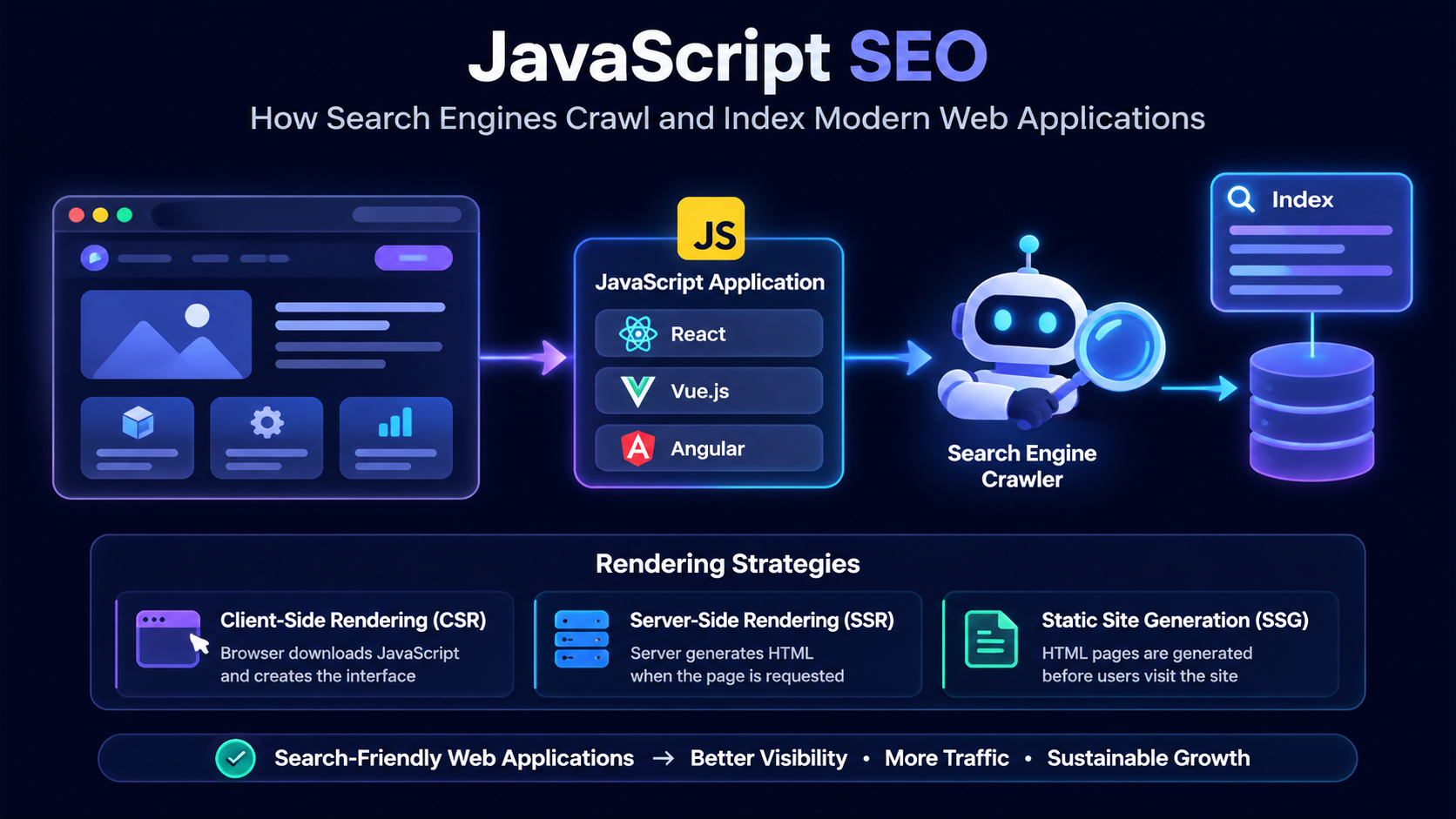
These technologies have made it possible to build applications that feel fast, responsive, and similar to native software experiences. From SaaS platforms and business dashboards to e-commerce systems and customer portals, JavaScript applications have become a foundation for modern digital products.
However, building a great user experience is only one part of creating a successful application.
A modern application also needs to be discoverable.
A beautifully designed application that search engines cannot properly understand may struggle to attract organic traffic, reach new users, or compete in search results. This is where JavaScript SEO becomes an important consideration for developers, founders, and technical teams.
JavaScript SEO is not simply a marketing concern. It is an engineering consideration that affects how applications are designed, how content is delivered, and how users discover digital products.
While building and analyzing modern software systems, I have learned that decisions made during development can influence search visibility. Choices around rendering strategies, application architecture, routing, site performance optimization, and content delivery all play a role in how search engines interact with an application.
A developer may focus on creating reusable components, clean code, scalable APIs, and excellent user experiences. These are important. However, if public-facing pages are not accessible to search engines, the application may lose valuable opportunities for visibility.
In this article, I will explain how JavaScript SEO works, how search engines process modern applications, why JavaScript applications face unique SEO challenges, and the engineering practices that help create applications that are both user-friendly and search-engine friendly.
What Is JavaScript SEO?
JavaScript SEO is the process of optimizing JavaScript-powered applications so that search engines can discover, process, understand, and index their content correctly.
Traditional websites usually work by sending complete HTML documents from the server to the browser. When a user or search engine accesses a page, the content is already available inside the HTML.
The process is relatively simple:
A user or search engine crawler requests a URL from the server. The request tells the server which page content needs to be delivered.
The server sends a complete HTML document containing the page structure, headings, text content, links, images, and important metadata.
The browser reads the HTML document and immediately displays the page content to the user without needing additional JavaScript processing.
Modern JavaScript applications often work differently.
Many applications initially return a basic HTML document and then use JavaScript to create the final user interface inside the browser.
The process may look like this:
The user or search engine crawler requests a URL from the application. At this stage, the browser is asking for the resources needed to load the web application.
Instead of sending a fully populated webpage, the server may return a basic HTML structure containing the application container, references to JavaScript files, stylesheets, and other required resources.
The browser downloads JavaScript bundles containing the application logic, components, routing, and functionality required to build the interface.
JavaScript executes in the browser and dynamically creates the page content, including components, data displays, and interactive elements.
The application is now fully loaded. Users can navigate, submit forms, interact with components, and use features without traditional page reloads.
This approach provides developers with flexibility and allows them to create rich experiences. However, it also introduces additional steps that search engines must process.
The challenge is not that JavaScript is bad for SEO. Modern search engines are capable of processing JavaScript. The challenge is ensuring that the application architecture allows search engines to access important content efficiently.
A well-designed JavaScript application can achieve excellent SEO performance. The difference comes down to how the application is built.
Why JavaScript SEO Matters for Modern Applications
JavaScript is now used across many types of digital products.
Examples include:
- SaaS platforms with dashboards and user portals
- E-commerce applications with dynamic product experiences
- Business management systems
- Customer relationship management platforms
- Interactive documentation websites
- Web applications built with modern frameworks
In many cases, the application itself may not require search visibility because users access it after authentication.
For example, a private dashboard containing customer reports or internal business data does not need to rank on Google.
However, most digital products also have public-facing pages that need visibility.
These may include:
- Homepage
- Product pages
- Feature pages
- Pricing pages
- Documentation
- Blog articles
- Landing pages
These pages help attract visitors, educate potential customers, and support business growth.
This is especially important for SaaS products.
A SaaS application may have a private dashboard where users manage their accounts, but the company still needs search-friendly pages to attract new customers.
This creates an important distinction:
The application experience and the marketing experience may use similar technologies, but they have different SEO requirements.
Understanding this difference helps developers make better architectural decisions.
How Search Engines Process JavaScript Applications
To understand JavaScript SEO, it is important to understand the stages search engines use when processing pages.
The main stages are:
- Crawling
- Rendering
- Indexing
Each stage affects whether a page can appear in search results.
Crawling: How Search Engines Discover Pages
Crawling is the process where search engines discover URLs and collect information about available pages.
For traditional websites, search engines can often discover pages through:
- links
- sitemaps
- website navigation
- external references
Modern applications need to follow the same principles.
A common mistake in JavaScript applications is creating navigation systems that work perfectly for users but make discovery difficult for search engines.
For example:
A user may click a button that triggers JavaScript and loads new content.
From the user’s perspective, everything works.
However, if there is no proper URL associated with that content, search engines may struggle to discover and understand the page.
A search-friendly application should provide meaningful URLs.
For example:
https://example.com/products
is more useful than:
https://example.com/#/products
Clean URLs provide better context for:
- search engines
- users
- sharing
- analytics systems
The URL structure is part of the application architecture and should be considered early during development.
Rendering: How Search Engines See JavaScript Content
After discovering a page, search engines need to process the content.
This process is called rendering.
Rendering allows search engines to execute JavaScript and understand the final version of the page.
A JavaScript application may initially provide something like:
<div id="root"></div>
The actual content appears only after JavaScript executes.
For example:
Before JavaScript execution:
<div id="root"></div>
After JavaScript execution:
<h1>Enterprise Payroll Software</h1>
<p>Manage employee payments, reporting, and compliance.</p>
The difference between these two states is important.
If important content only exists after complex JavaScript processing, search engines may take longer to understand the page.
This does not mean JavaScript applications cannot rank. It means developers need to think carefully about how content is delivered.
Indexing: How Pages Enter Search Results
After crawling and rendering, search engines analyze the content and decide whether it should be stored in their index.
For a page to have strong search visibility, search engines need to understand:
- what the page is about
- which topics it covers
- how it relates to other pages
- whether it provides useful information
This is why technical SEO and content strategy work together.
A technically perfect application with poor content may struggle.
A great article hidden behind poor rendering may also struggle.
Successful applications need both:
- strong engineering foundations
- valuable content
Why JavaScript Applications Face SEO Challenges
JavaScript frameworks provide many advantages, but they introduce technical decisions that developers must handle carefully.
The main challenges usually involve rendering, metadata, routing, and performance.
Client-Side Rendering Challenges
Client-side rendering is one of the most common approaches in JavaScript applications.
With client-side rendering, the browser receives the application code and creates the page dynamically.
The process looks like this:
The user enters a URL or clicks a link to access the web application. The browser sends a request to the server asking for the resources needed to load the application.
Instead of sending a fully rendered webpage, the server delivers the application structure, JavaScript files, stylesheets, and supporting resources required for the browser to build the interface.
The browser downloads the required JavaScript bundles containing the application logic, components, routing, and interactive functionality.
The browser executes JavaScript code and dynamically generates the user interface by creating components, loading data, and updating the page content.
The application is now visible and interactive. Users can navigate between views, submit information, and use application features without traditional full-page reloads.
This approach is known as Client-Side Rendering (CSR). The browser is responsible for creating the final page after downloading and executing JavaScript. This provides developers with powerful tools for creating highly interactive experiences, but it also introduces additional considerations for SEO because the initial HTML response may not contain the complete page content.
These challenges are especially common with Single Page Applications (SPAs), where content delivery depends heavily on JavaScript execution. I explored this topic in more detail in my guide on Single Page Application SEO: How to Make JavaScript Applications Search Engine Friendly.
For applications where search visibility is important, developers need to carefully consider whether pure client-side rendering is the right choice or whether approaches such as Server-Side Rendering (SSR), Static Site Generation (SSG), or hybrid rendering would provide better results.
This approach works extremely well for interactive applications. It is commonly used for:
- dashboards
- productivity tools
- internal systems
- complex user interfaces
However, public pages that depend heavily on client-side rendering require additional SEO consideration. If the initial HTML contains very little meaningful content, search engines may need extra processing before understanding the page. For applications where SEO is important, developers often consider approaches such as server-side rendering, static generation, or hybrid rendering.
Server-Side Rendering (SSR): Improving Content Delivery and Search Visibility
Server-Side Rendering is one of the most common solutions developers consider when building JavaScript applications that require strong SEO performance.
Unlike Client-Side Rendering, where the browser creates the interface after downloading and executing JavaScript, Server-Side Rendering generates the HTML content on the server before sending it to the user.
The process changes from:
How the Rendering Process Changes
The main difference between Client-Side Rendering and Server-Side Rendering is where the application content is generated.
Client-Side Rendering (CSR)
The browser creates the final interface after downloading JavaScript.
Server-Side Rendering (SSR)
The server creates the HTML before sending it to the browser.
With SSR, search engines and users receive meaningful HTML content earlier in the process.
This approach is particularly useful for websites and applications where content visibility directly affects business outcomes.
Examples include:
- SaaS marketing websites
- E-commerce platforms
- Product landing pages
- Documentation websites
- Public business applications
The main advantage of SSR is that the initial response contains the content required to understand the page.
Instead of waiting for JavaScript execution to create the interface, the server prepares the page before delivery.
This can improve:
- initial loading experience
- crawlability
- content discovery
- performance perception
However, SSR is not a replacement for good architecture.
A poorly designed SSR application can still have performance issues, unnecessary complexity, and inefficient data fetching patterns.
The goal is not simply to use SSR everywhere. The goal is to choose the rendering strategy that matches the purpose of the application.
How Server-Side Rendering Works
In an SSR application, the server is responsible for preparing the first version of the page.
For example, imagine a SaaS website displaying a pricing page.
With client-side rendering, the browser may need to:
- Load the application
- Download JavaScript
- Execute the code
- Fetch pricing information
- Generate the interface
With server-side rendering:
- User requests the pricing page
- Server retrieves the required information
- Server creates the HTML
- Browser receives the completed page
- JavaScript enhances the experience
The user receives meaningful content sooner, while JavaScript still provides the interactive experience modern applications require.
Frameworks such as Next.js have made SSR easier to implement by providing built-in rendering capabilities and application architecture patterns.
When Should Developers Use SSR?
SSR is useful when pages need to be discovered, indexed, and ranked.
Examples include:
Marketing Pages
A company homepage, product page, or service page benefits from being immediately understandable to search engines.
For example:
A page targeting:
“custom SaaS development services”
should expose meaningful content in the initial response.
Content Platforms
Blogs, documentation, and knowledge bases rely heavily on search visibility.
Users should be able to discover individual articles through search engines.
Product Pages
E-commerce and software product pages often depend on organic traffic.
Search engines need access to product information, descriptions, pricing details, and structured data.
Static Site Generation (SSG): Building Pages Before Users Request Them
Static Site Generation takes a different approach.
Instead of generating pages on demand, pages are created during the build process.
Content comes from sources such as a CMS, database, Markdown files, APIs, or application data. This is the information that will be used to generate the final pages.
During the build process, the application framework collects the content, runs the required code, and creates complete HTML pages before deployment.
The finished HTML files are created and stored before anyone visits the website. These pages are ready to be delivered immediately when requested.
When users or search engines request a page, the server delivers the already-generated HTML quickly without needing to create the page at that moment.
This approach works extremely well for content that does not change frequently.
Examples include:
- blogs
- documentation
- company websites
- portfolio websites
- landing pages
The advantage is speed.
Because the pages already exist, the server does not need to generate them for every visitor.
The result is often:
- faster loading
- simpler hosting
- excellent scalability
- strong SEO performance
For a technical blog or personal brand website, SSG can be an excellent choice because articles and pages are usually updated less frequently than application data.
Choosing Between SSR and SSG
The choice between SSR and SSG depends on how often content changes and how users interact with the application.
A Modern SaaS Application Can Use Multiple Rendering Strategies
Not every part of an application has the same requirements. Public pages need search visibility, while private application areas need speed, security, and rich user interaction.
Public Marketing Website
Homepage, pricing pages, feature pages, blogs, documentation
Pages are generated before users visit the website.
Search engines can easily crawl content and users receive pages quickly.
Private Application Dashboard
Reports, workflows, settings, analytics, user-specific features
The browser creates a highly interactive application experience.
Users interact with a responsive application without traditional page reloads.
A blog article published once may work perfectly with static generation.
A personalized dashboard showing real-time user information requires a different approach.
A modern application may combine multiple strategies.
This hybrid approach is common in modern SaaS platforms.
The public website focuses on discoverability and conversion.
The private application focuses on usability and functionality.
Hybrid Rendering: Combining Different Approaches
Modern frameworks increasingly allow developers to combine rendering strategies instead of choosing only one.
A real-world SaaS application may include:
Static Pages
Examples:
- homepage
- about page
- blog articles
- documentation
These pages benefit from SSG because they are content-focused.
Server Rendered Pages
Examples:
- pricing pages
- frequently updated product information
- dynamic landing pages
These may benefit from SSR.
Client Rendered Pages
Examples:
- dashboards
- analytics tools
- user settings
- internal workflows
These usually require the interactivity provided by CSR.
This approach allows developers to optimize each part of the product based on its purpose.
A common mistake is treating an entire application as one rendering problem.
In reality, different parts of the same product often have different requirements.
JavaScript SEO Challenges Developers Need To Consider
Understanding rendering strategies is important, but developers also need to address specific technical challenges that affect JavaScript SEO.
Empty HTML Content
One common challenge with JavaScript applications is the initial HTML response containing very little content.
For example:
<div id="root"></div>From the user’s perspective, this is not a problem because JavaScript quickly creates the interface.
However, the initial response provides limited information before rendering happens.
For important public pages, developers should ensure that meaningful content is available as early as possible.
This includes:
- headings
- paragraphs
- navigation links
- structured information
- metadata
Dynamic Metadata Problems
Metadata provides important information about a page.
Search engines use elements such as:
- title tags
- meta descriptions
- Open Graph information
to understand and present pages.
A common problem in JavaScript applications is accidentally sharing the same metadata across multiple pages.
For example:
<title>My Application</title>Every route should not have the same title.
A better approach:
<title>Payroll Software for Growing Businesses | Company Name</title>Each important page should communicate its purpose clearly.
For example:
A SaaS homepage might focus on the product.
A feature page might focus on a specific capability.
A blog article should describe the topic being discussed.
JavaScript Routing and Search-Friendly URLs
Routing determines how users move through an application.
It also affects how search engines discover pages.
Modern applications should create meaningful URLs.
Example:
Poor:
example.com/#/featuresBetter:
example.com/featuresClean URLs provide several benefits:
- easier sharing
- clearer structure
- better analytics
- improved understanding by search engines
Applications should also ensure important pages are connected through proper links.
A page that exists but has no discoverable path may struggle to receive visibility.
Performance Optimization and JavaScript SEO
SEO is not only about whether content exists.
Performance also affects user experience.
Modern applications often include:
- large JavaScript bundles
- multiple dependencies
- third-party scripts
- complex components
Without optimization, these can slow down the application.
Important performance considerations include:
JavaScript Bundle Size
Large bundles require more time to download and execute.
Developers can improve performance through:
- code splitting
- removing unnecessary dependencies
- lazy loading components
- optimizing libraries
Core Web Vitals
Performance metrics such as:
- Largest Contentful Paint
- Interaction to Next Paint
- Cumulative Layout Shift
help measure user experience.
A technically advanced application should still feel fast and responsive.
JavaScript SEO With React, Vue, Angular, and Next.js
Different JavaScript frameworks provide different approaches to SEO.
React SEO
React provides developers with a powerful component-based architecture.
However, a React application requires careful consideration around:
- rendering strategy
- routing
- metadata
- performance
A React SPA can rank, but developers need to ensure search engines can access important content.
Frameworks such as Next.js extend React with features like:
- server rendering
- static generation
- improved routing
- metadata management
Vue SEO
Vue provides a flexible approach to frontend development.
For SEO-focused Vue applications, frameworks such as Nuxt provide additional rendering capabilities.
Nuxt allows developers to build applications with:
- server rendering
- static generation
- improved content delivery
Angular SEO
Angular applications can also achieve strong SEO performance.
Solutions such as Angular Universal allow developers to generate server-rendered content.
The important lesson across all frameworks is that SEO depends less on the framework name and more on architecture decisions.
JavaScript SEO for SaaS Applications
As someone who builds software systems, I see JavaScript SEO as especially important for SaaS products.
A SaaS application is usually not just one website.
It normally consists of multiple experiences serving different purposes.
The public side exists to attract users.
The application side exists to serve users.
A Typical SaaS Application Structure
A SaaS product usually combines a public-facing website for attracting users and a private application for delivering business functionality.
Landing pages, product pages, blog content, documentation, and SEO-focused resources.
Users discover the product through search engines, content marketing, and organic traffic.
Visitors become users by creating accounts, starting trials, or subscribing to the service.
The authenticated product experience where users manage data, workflows, settings, reports, and business processes.
The software delivers measurable value by improving efficiency, automating processes, and helping businesses achieve their goals.
A SaaS application is not only the dashboard that users interact with after signing in. It is an entire ecosystem that begins before a user creates an account.
The marketing website is responsible for discovery. This is where SEO plays a critical role because potential customers need to find the product through search engines. Blog articles, landing pages, documentation, and product pages help attract users who are searching for solutions.
Once a visitor discovers the product, the journey moves toward signup and onboarding. After authentication, the user enters the application dashboard where the focus changes from visibility to functionality.
This separation is important when making architecture decisions. The public-facing parts of a SaaS platform often benefit from SSR or SSG because they require search visibility. The authenticated application area can rely more heavily on CSR because the priority is a smooth and interactive user experience.
The marketing website needs:
- SEO
- content
- landing pages
- documentation
- product information
The application dashboard usually needs:
- authentication
- security
- performance
- usability
It does not necessarily need to rank because users access it after signing in.
Understanding this separation helps developers build better SaaS products.
How I Approach JavaScript SEO When Building Applications
When building modern applications, I believe SEO should be considered during architecture planning rather than added after development.
Many SEO problems are actually engineering problems.
They often begin with decisions around:
- rendering strategy
- routing architecture
- content delivery
- application structure
- performance optimization
Before building a public-facing application, I consider questions such as:
- Which pages need search visibility?
- Which pages require dynamic functionality?
- Should this section use SSR, SSG, or CSR?
- How will content be delivered?
- How will search engines discover important pages?
These decisions influence the long-term success of the application.
A well-designed application should not force a choice between user experience and search visibility.
With the right architecture, developers can build products that are:
- fast
- scalable
- secure
- interactive
- discoverable
JavaScript SEO Checklist for Developers
Before launching a JavaScript application, developers should review:
Use Search-Friendly URLs
Create clear URLs that represent real pages and resources.
Provide Unique Metadata
Ensure every important page has relevant titles and descriptions.
Choose the Right Rendering Strategy
Use CSR, SSR, SSG, or hybrid rendering depending on the purpose of each page.
Optimize JavaScript Performance
Reduce unnecessary scripts and improve loading efficiency.
Create Crawlable Navigation
Use proper links so search engines can discover important content.
Monitor Search Performance
Use tools such as Google Search Console to understand indexing and visibility.
Test Pages Before Launch
Review how pages appear without relying only on the browser experience.
Final Thoughts
JavaScript has transformed modern web development by allowing teams to build powerful and interactive applications.
However, building a successful application requires more than writing frontend code.
The architecture behind the application determines how well it performs, how users experience it, and how easily search engines can understand it.
JavaScript SEO is not about avoiding modern frameworks.
It is about making thoughtful engineering decisions.
Whether building a SaaS platform, business application, or modern website, developers need to consider both the user experience and the search experience.
The best applications are not only functional.
They are scalable, accessible, fast, and discoverable.