
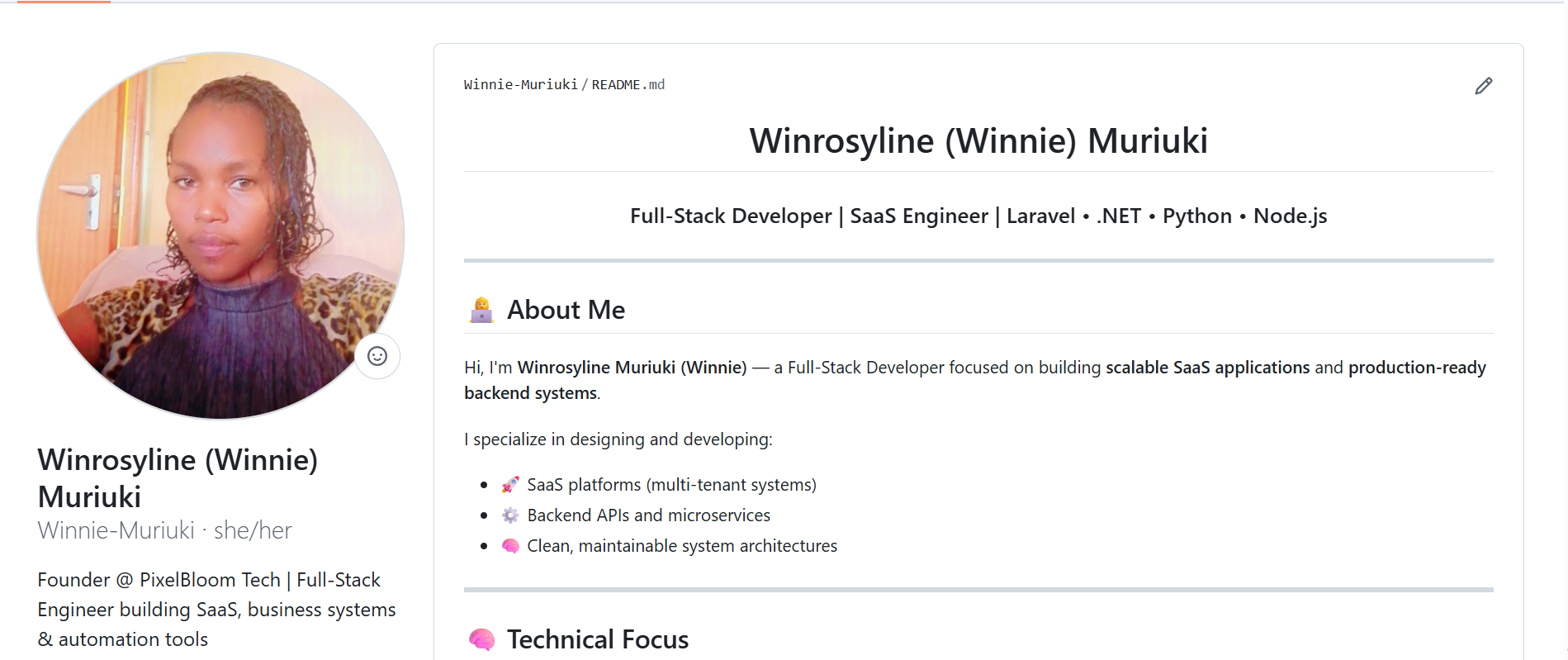
My name is Winrosyline (Winnie) Muriuki, and I focus on building scalable SaaS applications and backend systems using Laravel, .NET, Python, and Node.js. Like many developers, I started with a basic GitHub account that had little structure and almost no visibility. Over time, I realized that simply writing code is not enough. You also need to present your work in a way that makes people understand what you do and why it matters.
This post walks through how I transformed my GitHub profile into something that reflects my direction as a SaaS engineer, and how you can do the same in a practical and realistic way.
Why Your GitHub Profile Matters More Than Ever
GitHub has evolved into more than a development platform. It is now a discovery tool. Recruiters search for developers there. Other engineers look for people to collaborate with. Founders look for technical partners. Even clients sometimes check GitHub before deciding whether to trust someone with a project.
What makes GitHub powerful is that it shows real work. Unlike a resume, which can be polished and exaggerated, GitHub reflects consistency, structure, and actual coding ability. When someone lands on your profile, they are trying to answer a simple question. What kind of developer is this person?
If your profile does not answer that clearly, you lose attention almost immediately.
Creating a Profile That Actually Represents You
One of the most important steps I took was creating a proper GitHub profile README. This is a special feature that many developers still overlook. When you create a repository with the exact same name as your GitHub username, GitHub displays the README file from that repository at the top of your profile.
This becomes your homepage.
Instead of leaving my profile empty or relying only on pinned repositories, I used the README to introduce myself properly. I made sure that anyone visiting my profile could immediately understand that I am a full stack developer focused on SaaS and backend systems.
As I refined my GitHub profile, I realized that structure and clarity matter more than complexity. You are not trying to impress people with complex wording. You are trying to make your focus obvious within a few seconds.
Structuring the README for Maximum Impact
A good README is not long for the sake of being long. It is structured in a way that guides the reader.
I started with a clear heading using my name, Winrosyline Muriuki, while also including Winnie Muriuki for search visibility. This helps with personal branding while still being discoverable.
Then I added a short introduction that highlights exactly what I do. I avoided vague statements and focused on specific areas like SaaS applications and backend development.
After that, I created sections that naturally flow into each other.
About Me
This section explains who I am and what I focus on. It is not a life story. It is a focused description of my role as a developer and the kind of problems I solve.
What I Build
Here, I made it clear what type of projects I work on. Instead of listing random technologies, I framed it around outcomes. SaaS platforms, APIs, automation tools, and scalable applications communicate much more value than just naming languages.
Current Focus
This section shows direction. It tells people what I am actively improving or building. In my case, that includes system design, architecture, and public SaaS projects.
Featured Projects
Even if your projects are not complete, this section matters. It shows intent. It tells people that you are building something real and not just learning passively.
Making Your Profile Visually Engaging Without Overdoing It
There is a balance between a clean profile and an engaging one. Adding visuals like GitHub stats can make your profile feel alive, but relying on them too much can make it look cluttered or even broken if the services fail.
I added GitHub stats to show activity, but I also learned that these tools sometimes go down. When that happens, you might see errors like deployment paused or service unavailable. This is not a problem with your profile but with the external service.
The key is to treat visuals as enhancements, not the core of your profile. Your content should still make sense even if the visuals disappear.
Why SEO Matters Even on GitHub
One of the most overlooked aspects of GitHub profiles is search engine optimization. Many developers assume that GitHub is separate from Google, but that is not true. GitHub profiles are indexed, and they can rank for your name and your skills.
I intentionally included both versions of my name, Winrosyline Muriuki and Winnie Muriuki, in my README. This helps connect my identity across different platforms. I also included relevant keywords such as SaaS developer, Laravel developer, .NET developer, and backend engineer.
The goal is not to stuff keywords everywhere but to naturally include them in a way that reflects what you actually do. When done correctly, this increases the chances of your profile appearing in search results when someone looks up your name or skillset.
Building in Public Changes Everything
One of the biggest mindset shifts I had was realizing that I did not need to wait until my projects were perfect before sharing them. Many developers hide their work because they feel it is not ready. The problem with that approach is that you remain invisible.
Instead of writing that projects are coming soon, I started listing what I am actively building. Even if a project is still in progress, it shows direction and commitment. It also gives people something to follow.
Building in public creates accountability. It pushes you to keep going because your work is visible. It also makes it easier for others to connect with what you are doing.
Connecting GitHub to Your Personal Website
Another important step was linking my GitHub profile to my personal website, winniemuriuki.co.ke. This creates a connection between platforms and strengthens your online presence.
When your website links to your GitHub and your GitHub links back to your website, search engines start to recognize that both belong to the same person. This improves your visibility and makes your personal brand more cohesive.
It also gives you more control. Your website is where you can share deeper insights, write blogs, and explain your work in more detail, while GitHub remains your technical showcase.
What Actually Makes a Profile Stand Out
After going through this process, I realized that standing out on GitHub is not about flashy designs or long descriptions. It comes down to a few key factors.
Clarity is the most important. People should immediately understand what you do.
Consistency matters because an active profile signals growth and reliability.
Direction is what makes people take you seriously. When your profile shows that you are focused on a specific path, like SaaS engineering, it becomes easier for others to see your value.
Finally, visibility ties everything together. If your work is not visible, it does not matter how good it is.
Lessons From the Process
Improving my GitHub profile taught me that presentation is just as important as technical ability. You can be a skilled developer, but if your work is not structured and visible, it is easy to be overlooked.
I also learned that small improvements compound over time. Updating a README, adding a project, or writing a blog post might seem minor on its own, but together they create a strong and consistent presence.
Most importantly, I understood that you do not need to have everything figured out before you start. Progress is more important than perfection.
Final Thoughts
If you are serious about growing as a developer in 2026, your GitHub profile should reflect that. It should clearly communicate who you are, what you build, and where you are going. You do not need a large number of projects to get started. You need structure, clarity, and a willingness to share your work.
I am continuing to build and improve my profile as I work on SaaS applications and backend systems. This is an ongoing process, and that is what makes it valuable. Your GitHub is not just a repository of code. It is your digital presence as a developer. Treat it that way, and it will start working for you.
If you want to follow my journey as I build scalable systems, you can explore my projects on GitHub.